Power failures are one of the most serious threats to any data centre. Even a few minutes of outage can trigger data corruption, hardware damage, SLA violations, and long recovery cycles. For Business Continuity Managers and Risk Officers, planning for a blackout isn’t optional but it’s a core responsibility.
This guide from Right Power will give you a practical, step-by-step checklist covering what to do before, during, and after a power-related disaster. It’s designed to be something you can save, share during internal briefings, and use as a reference when evaluating your disaster readiness.
Before the Blackout: Build a Power-Resilient Foundation
Most disaster recovery success happens before anything goes wrong. The goal is to reduce the chaos when the lights go out.
a. Conduct Battery Health & Load Testing
Power backup systems like UPS units, VRLA/ Li-ion batteries, rack level backup must be tested regularly. This includes:
- Battery impedance testing
- Runtime testing
- Measuring charge/ discharge cycles
- Identifying weak cells early
A failing battery isn’t a blackout, it’s the beginning of one.
b. Validate Your Load Shedding Plan
Not all systems need to stay online during a power failure. Define tier:
- Tier 1: Core systems (storage, network, mission-critical applications)
- Tier 2: Secondary workloads
- Tier 3: Non-essential systems
A pre-approved load shedding plan ensures survival rather than system collapse during extended outages.
c. Verify Generator Readiness
This is one of the most common weak points.
Check for:
- Fuel quality and fuel levels
- Monthly test runs
- Transfer switch responsiveness
- Oil level monitoring
- Any strange vibrations or delayed starts
If a generator fails during a blackout, recovery time multiplies.
d. Map Your Power Distribution
Risk officers often underestimate how many single points of failure hide in PDUs, breakers, cable routes, and bus ducts.
Know exactly:
- Which racks run on which PDU
- Which circuits carry redundant feeds
- Where each A/B power path originates
You can’t fix what you didn’t know was broken.
e. Document Your Manual Override Procedures
If automation fails, what’s the human fallback?
Your team should know:
- Who triggers the shutdown
- Who performs manual switchover
- Which consoles need physical access
- How long each system takes to restart
A blackout is not the time to search for instructions.
During the Blackout: Keep Control Amid the Chaos
A power outage will never be stress-free, but a clear action plan keeps panic away.
a. Activate the Power Incident Protocol
Announce the event immediately.
- The goal is coordination, not noise.
- Notify the DR team
- Freeze all non-essential IT tasks
- Lock down changes
Begin incident communication updates
b. Monitor UPS Runtime in Real-Time
The backup clock is ticking. Keep watch on:
- Remaining battery runtime
- Load spikes
- Temperature increase
- Any UPS alarms or bypass events
Knowing exactly how much time you have lets you make the right decisions early.
c. Execute Load Shedding
If the outage will extend beyond your UPS runtime window, begin shutting down non-critical systems in the correct order.
This protects your core infrastructure and prevents uncontrolled shutdowns.
d. Prioritise Data Integrity Over Uptime
A clean shutdown is better than a corrupted file system.
If uptime becomes impossible:
- Sync storage
- Gracefully terminate applications
- Shut down hypervisors and VMs in order
- Halt non-persistent workloads
A controlled decline is far safer than a crash.
After the Blackout: Recover with Discipline
Once power returns, the temptation is to restart everything immediately. Resist it.
a. Validate Power Stability First
Check:
- Voltage stability
- Harmonic distortion
- Generator-to-grid transition
- PDU and breaker status
- UPS bypass conditions
Don’t power up your racks until you’re sure they’re safe.
b. Restore Systems in Logical Order
Follow the reverse of your shutdown sequence:
- Core network systems
- Storage clusters
- Authentication services
- Virtualisation layers
- Distributed applications
- Non-critical workloads
This prevents dependency failures.
c. Review Error Logs Immediately
Look for:
- Unexpected shutdowns
- Storage sync issues
- Power supply faults
- Overheating alerts
- Application-level corruption
Early detection = faster recovery.
d. Conduct a Post-Mortem Analysis
The value is in the lessons learned.
Document:
- Root cause
- What worked
- What failed
- What must be upgraded
- What needs clearer SOPs
- Where staff hesitated or lacked information
A blackout is wasted if you don’t learn from it.
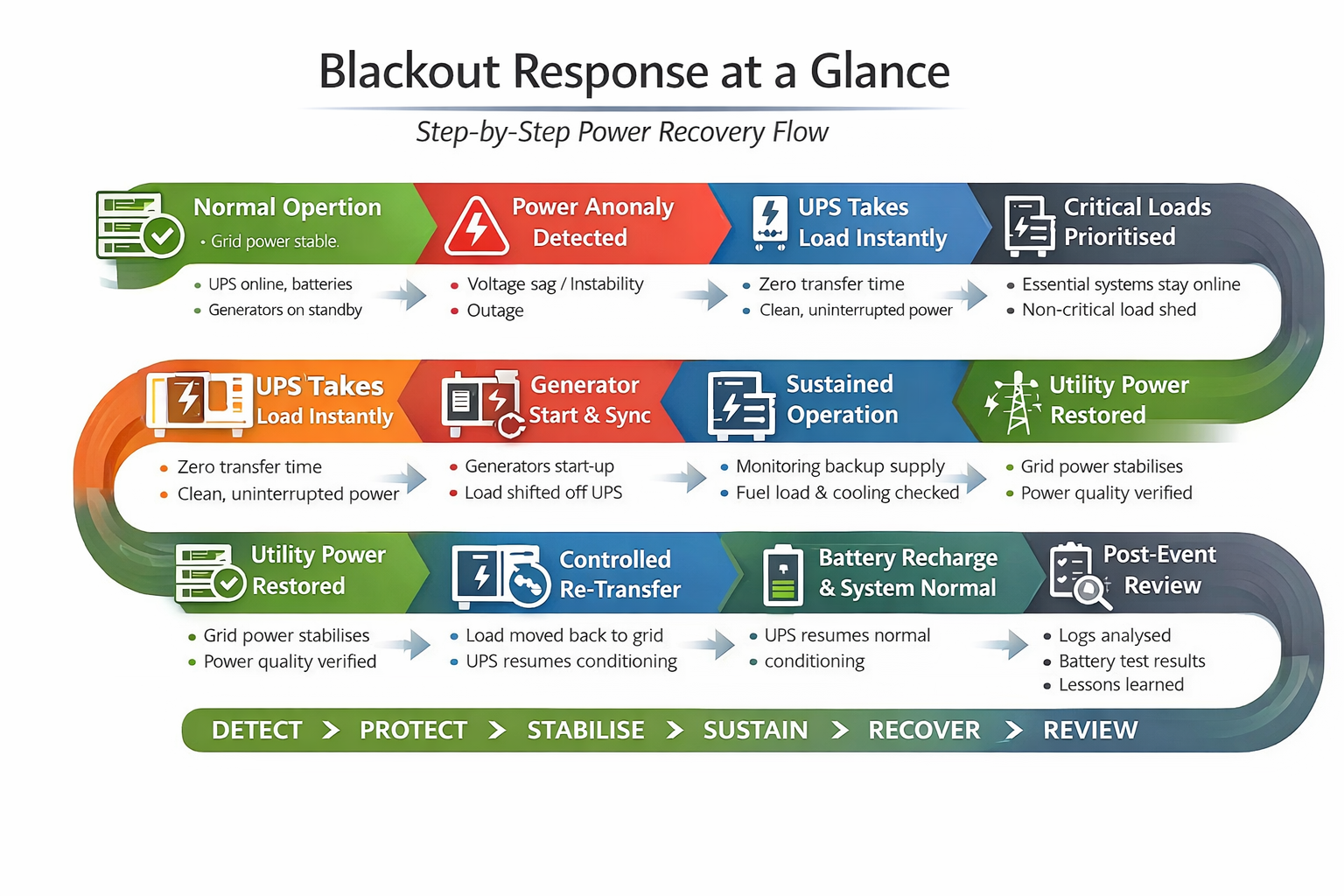
Data Centre Blackout Checklist Response at a Glance: Step-by-Step Power Recovery Flow
Here’s a summary for data centre blackout checklist:
Conclusion: Your Power Failure Plan Is Only as Strong as Your Preparation
Blackouts are unpredictable, but your response shouldn’t be. A well-prepared data centre team knows exactly what to do before, during, and after a power outage. When plans are clear, systems are documented, and backups are tested, you reduce data loss, downtime, and chaotic recovery.
Find more about: